Discover the world of OrderBlox
Building blocks of insight into your trading toolbelt!
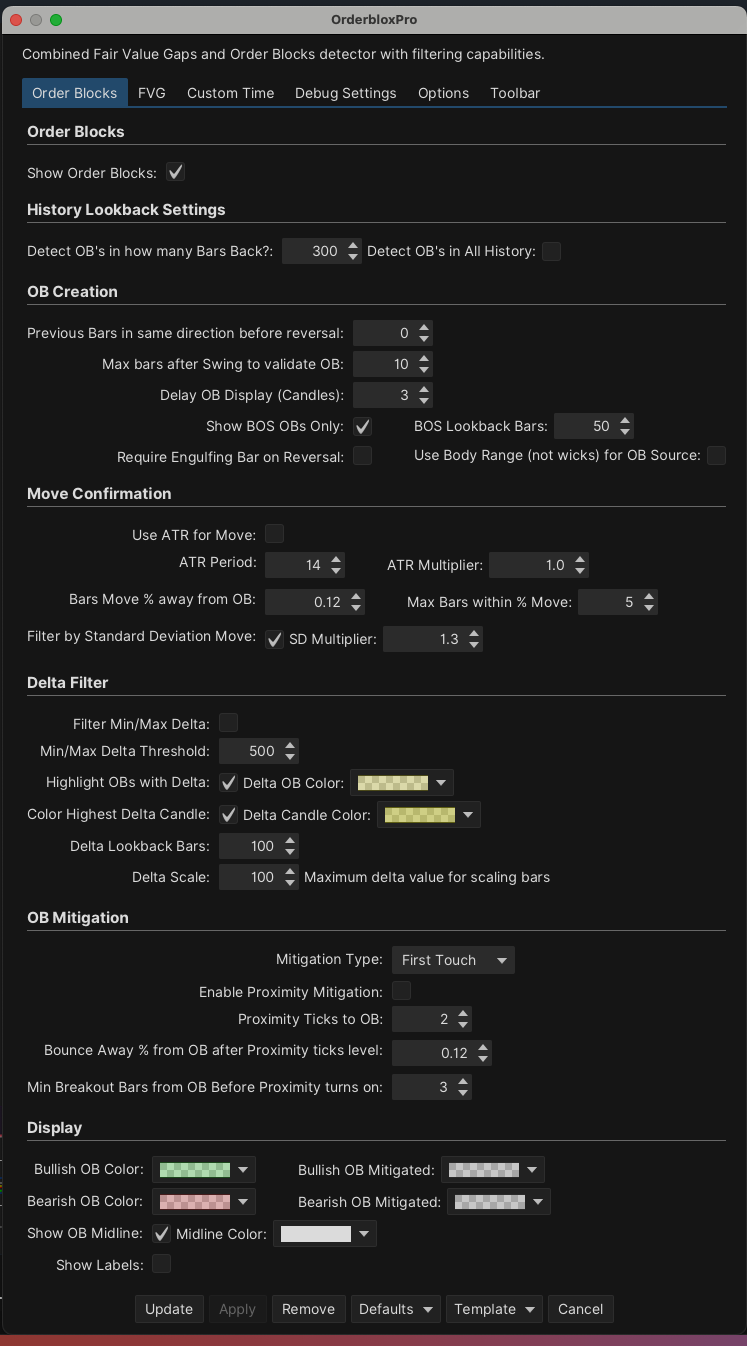
See the power behind the order blocks by knowing how much delta it took to create them.
OrderBlox with
Delta Filters
A unique approach with Order Blocks.
- Customize how/when you want a order block displayed
- Use filters to show or highlight order blocks with delta/agression
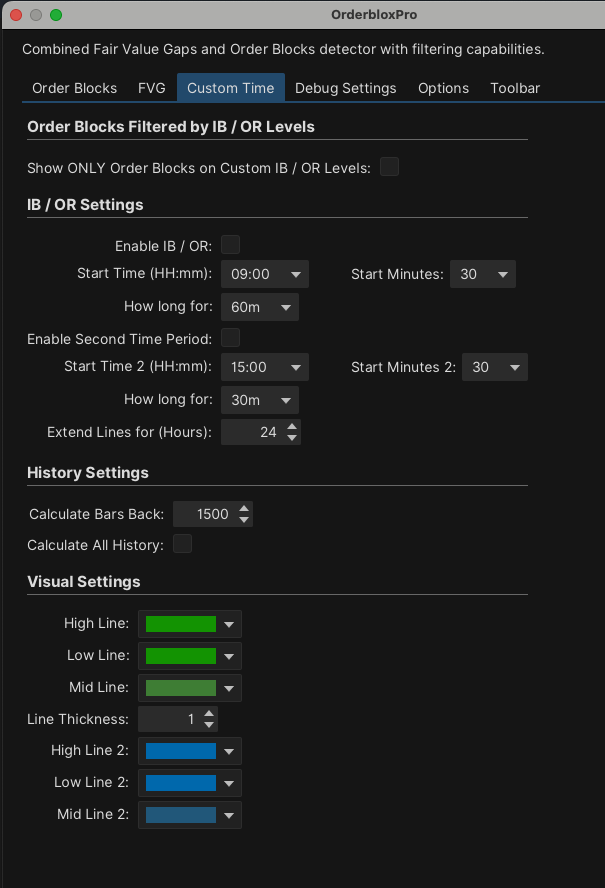
- Filter Orderblocks that are formed in line with custom levels
- Mitigation includes tick proximity, which mitigates if price comes within x ticks of the OB.
- Use and show only OBs that are in line / confluence with trendlines.
- And much more…
OrderBlox stands out..!
Advanced OB Detection
Customizable rules for OB formation, including the option to use candle body range instead of full wicks.
Sophisticated OB FVG Filtering
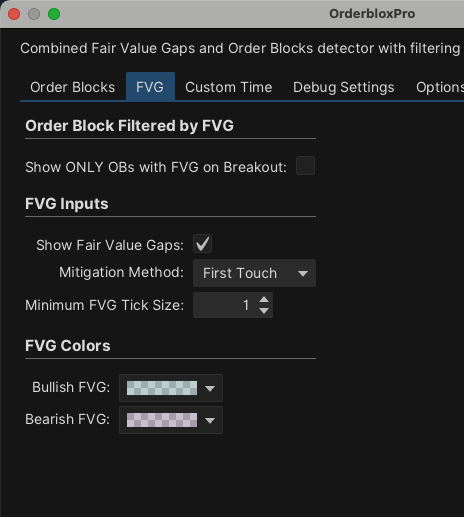
Filter and only show OrderBlocks that have FVGs formed after the OrderBlock.
Break of Structure (BOS)
Only show OBs that lead to a clear market structure break, keep with the trend.
Engulfing Candle Filter
Only show OrderBlocks with engulfing candles present that form the orderblock.
Volume & Delta Filter
Filter OB source candles based on their volume from Min/Max deltas, see the aggression.
Standard Deviation Move
Confirm OBs based on the subsequent price move being a certain multiple of the OB candle's height.
Customizable OB Mitigation
OBs can be mitigated with options for "First Touch" or "Midpoint" of the OB zone or "Proximity Mitigation".
Flexible Move Confirmation
Validate OBs based on price moving away by standard deviation, percentage or ATR.
Delayed OB Display
Users can specify a number of candles after an OB's formation before it is displayed, allowing time for the OB to "prove" itself by not being immediately invalidated.
Visual Customization
Extensive color options for OBs (active and mitigated), FVGs, time-based levels, delta highlights, and more.
Detailed History
Options to calculate OBs over a specified lookback period or entire chart history. See whats important to you.
FVG Integration
Detects FVGs and allows filtering Order Blocks based on the presence of an FVG, adding a layer of confluence to trading setups.
OrderBlox Versions
OrderBlox Lite
OrderBLox Pro
OrderBlox Ultimate
Choose your version
OrderBlox Lite
Featuring displaying of order blocks, filtering by engulfing candles, BOS and more. Choose unmitigated and/or mitigated OBs.
- Advanced Order Block Identification
- Highly Customizable OB Validation
- Live OB Mitigation Tracking
- Dynamic OB Visualization
- Break of Structure (BOS) Filter
- Standard Deviation Breakout Strength
- Confirmation Delay for OBs
- FVG's Displays on the chart
- FVG Mitigation
OrderBlox Pro
Includes all of "Lites' functions plus FVG filtering, ATR, and Custom Time Range filtering.
- Advanced Order Block Identification
- Highly Customizable OB Validation
- Live OB Mitigation Tracking
- Dynamic OB Visualization
- Break of Structure (BOS) Filter
- Standard Deviation Breakout Strength
- Confirmation Delay for OBs
- Automatic FVG Detection
- FVG Mitigation Tracking
- Filter OBs by FVGs
- Custom Time Range Highs and Lows
- Filter OBs if in line with H/L of Time range
- Volume Delta Confirmation
- Visual Delta Strength in OBs
- Key Delta Candle Highlighting
- Filter OBs by amount of Delta in OB
- Use ATR for signifiant moves
- Full PDF guide available after purchase
OrderBlox Ultimate
The 'creme de la creme' of OrderBlox, Including all 'Pros' functions with Volume profile analysis filtering and trendline filtering.
- Advanced Order Block Identification
- Highly Customizable OB Validation
- Live OB Mitigation Tracking
- Dynamic OB Visualization
- Break of Structure (BOS) Filter
- Standard Deviation Breakout Strength
- Confirmation Delay for OBs
- Automatic FVG Detection
- FVG Mitigation Tracking
- Filter OBs by FVGs
- Custom Time Range Highs and Lows
- Filter OBs if in line with H/L of Time range
- Volume Delta Confirmation
- Visual Delta Strength in OBs
- Key Delta Candle Highlighting
- Filter OBs by amount of Delta in OB
- Use ATR for signifiant moves
- Trend Line visualization
- Filter OBs by Trend Line
- Volume Anaysis of Order Blocks
- Filter Order Blocks inline with HVN's
OrderBlox Pro Settings